
Mobile development has always presented developers with a fundamental choice: build native apps for each platform or create cross-platform solutions that compromise on user experience. What if there was a third way? What if you could deliver native mobile experiences while leveraging your existing web expertise and Rails application?
Hotwire Native turns your web apps into native mobile experiences. You keep the fast development and easy maintenance of web technologies.
A Decision Framework Before You Choose Hotwire Native
Hotwire Native is strongest when the product is already web-first and most value comes from authenticated workflows backed by a Rails domain model. It is not a shortcut that makes every website a good mobile application. The useful question is whether the product can share behavior while still respecting the conventions of iOS and Android.
| Product characteristic | Strong signal for Hotwire Native | Warning signal |
|---|---|---|
| Core workflows | Forms, records, collaboration, approvals, content | Graphics-heavy interaction or continuous real-time rendering |
| Existing system | Mature responsive Rails application | No stable web product or fragmented backend APIs |
| Release needs | Business behavior changes frequently | Most changes are native presentation and device behavior |
| Team | Strong Rails/web ownership with targeted native skills | Separate native teams already shipping effectively |
| Offline use | Occasional cached states and graceful network recovery | Offline-first domain with complex synchronization |
I divide each user journey into three layers. The web layer owns business rules, server-rendered screens, validation, and data. The native shell owns navigation, lifecycle, permissions, and platform conventions. Bridge components are reserved for capabilities where the native experience materially improves the task: notifications, camera input, biometrics, share sheets, location, or a highly platform-specific control.
This boundary prevents two common failures. The first is building a thin wrapper that feels broken because it ignores native navigation and lifecycle. The second is moving so much behavior into Swift and Kotlin that the team recreates the two-codebase problem Hotwire Native was meant to avoid.
A staged delivery plan
- Select one representative journey, including authentication and error recovery.
- Define path configuration and navigation ownership before adding visual polish.
- Add analytics that distinguishes web navigation, native actions, and bridge calls.
- Test slow networks, expired sessions, deep links, app upgrades, and interrupted flows.
- Release to a small audience before expanding the set of web-driven screens.
The first milestone is not “the website opens in an app.” It is a complete journey that behaves correctly across process death, login expiry, back navigation, external links, and deployment of new server-rendered content.
The Hybrid Revolution: Best of Both Worlds
Traditional mobile development approaches force teams into difficult tradeoffs:
- Pure Native: Superior user experience but requires separate teams, codebases, and maintenance overhead
- Cross-Platform Frameworks: Code reuse but often at the cost of platform-specific optimizations and native feel
Hotwire Native breaks this paradigm by creating a hybrid architecture where your Rails application becomes the brain of your mobile app, while native iOS and Android components handle the presentation layer and platform-specific interactions.
The important decision is not whether to wrap a website in a native shell. It is which journeys remain web-driven, which require native components, and how navigation, authentication, releases, and analytics work across both environments. This is the core of a deliberate Hotwire Native and mobile systems architecture, not an afterthought at the end of a Rails project.
How Native Native works
At its core, Hotwire Native operates on a simple but powerful principle: your web application remains your single source of truth for business logic, data, and core functionality, while native mobile apps provide the shell that renders web content with native navigation, animations, and platform-specific components.
To get started, you only need a small native app on iOS and Android - just a few lines of code are enough to bring your Rails-powered mobile experience to life.
That’s all it takes to go native on iOS
import HotwireNative
import UIKit

let rootURL = URL(string: "https://hotwire-native-demo.dev")!

class SceneDelegate: UIResponder, UIWindowSceneDelegate {
    var window: UIWindow?

    private let navigator = Navigator(configuration: .init(
        name: "main",
        startLocation: rootURL
    ))

    func scene(_ scene: UIScene, willConnectTo session: UISceneSession, options connectionOptions: UIScene.ConnectionOptions) {
        window?.rootViewController = navigator.rootViewController
        navigator.start()
    }
}
The same simplicity - now on Android
package com.example.myapplication // update to match your project

import android.os.Bundle
import android.view.View
import androidx.activity.enableEdgeToEdge
import dev.hotwire.navigation.activities.HotwireActivity
import dev.hotwire.navigation.navigator.NavigatorConfiguration
import dev.hotwire.navigation.util.applyDefaultImeWindowInsets

class MainActivity : HotwireActivity() {
    override fun onCreate(savedInstanceState: Bundle?) {
        enableEdgeToEdge()
        super.onCreate(savedInstanceState)
        setContentView(R.layout.activity_main)
        findViewById<View>(R.id.main_nav_host).applyDefaultImeWindowInsets()
    }

    override fun navigatorConfigurations() = listOf(
        NavigatorConfiguration(
            name = "main",
            startLocation = "https://hotwire-native-demo.dev",
            navigatorHostId = R.id.main_nav_host
        )
    )
}
And the content? Rails will take care of that for you.
Building Bridges Between Rails and Mobile
The magic happens through Bridge Components - the communication layer between your web application and native mobile components. These bridges allow your Rails app to trigger native functionality like push notifications, camera access, or custom UI elements while maintaining the development speed of web technologies.
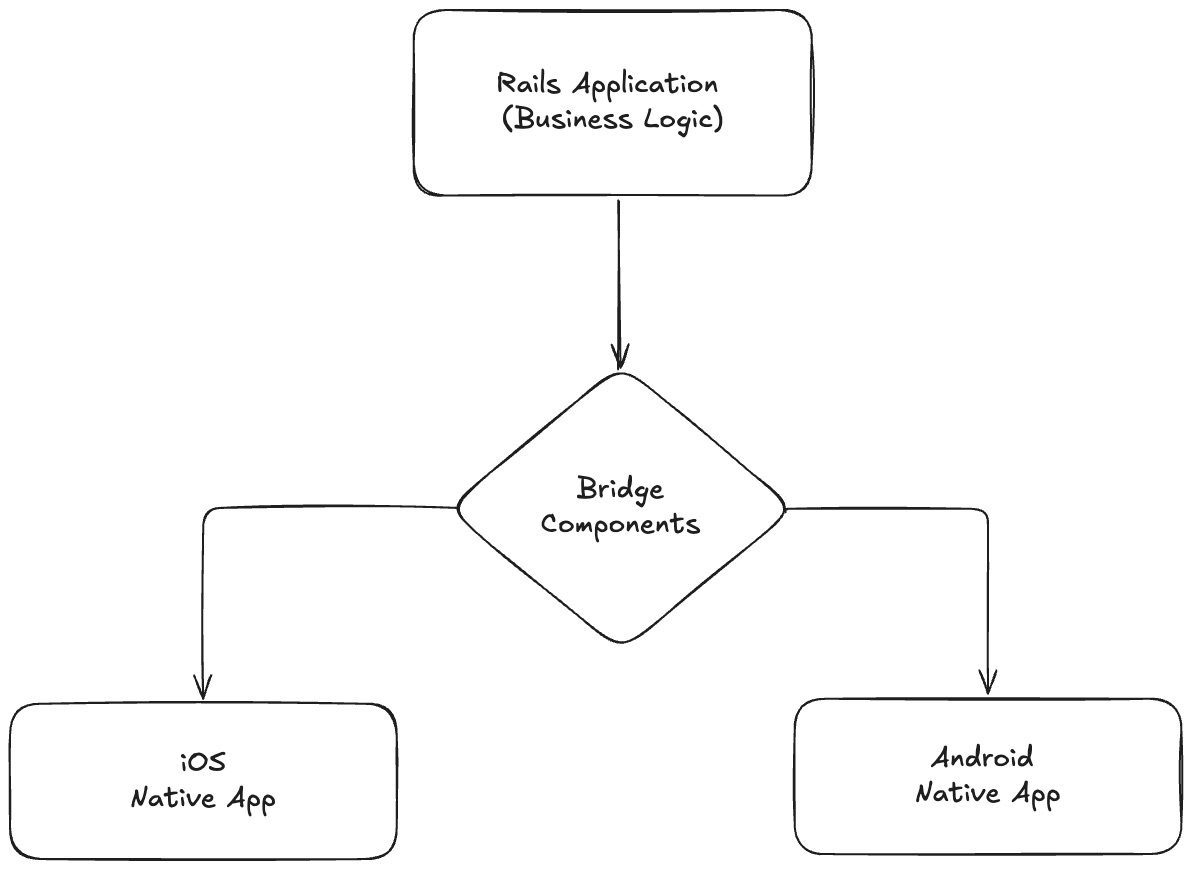
This architecture provides several key advantages:
- Single Codebase: Your Rails application handles all business logic, data management, and core functionality
- Native Performance: Platform-specific optimizations and native UI components where they matter most
- Instant Updates: Once your app passes initial App Store and Google Play Store review, all future changes are deployed instantly through your Rails application without requiring new app store submissions
- Rapid Development: Changes to your web app are instantly reflected in mobile apps
- Platform Integration: Deep integration with iOS and Android platform features through bridge components
- App Store Compliance: Meet both iOS App Store and Google Play Store requirements with proper native integration
Why Hotwire Native Matters
Hotwire Native represents a paradigm shift in mobile development. Instead of choosing between native performance and web development speed, you can have both. This approach is particularly powerful for:
- Startups that need to move fast with limited mobile expertise
- Web-first companies looking to extend their reach to mobile
- Teams that want to maintain a single codebase while delivering native experiences
- Applications where business logic changes frequently
The technology removes the traditional barriers between web and mobile development, allowing web developers to create sophisticated mobile applications without learning entirely new platforms and languages.
An earlier version of this article was published on Visuality.pl blog.