How to Add OAuth Auto-Discovery to an MCP Server in Rails

Originally published on Visuality Blog
The previous articles in our MCP series covered building MCP servers and clients with Rails. Those articles focused on the core protocol - how servers expose tools and how clients consume them - without addressing authentication. Production is different. When an MCP server holds sensitive business data and needs role-based access control, you need OAuth.
For developers, integrating OAuth into an MCP server is not particularly difficult. You generate a client_id and client_secret, configure the client, and the flow works. But MCP servers are not only for developers. When business users - sales teams, analysts, project managers - need to connect an AI client like Claude to an internal tool, asking them to deal with OAuth credentials is an unnecessary barrier. They already have a login and password to the application. They use those credentials every day. Why should connecting an AI client require anything more?
The MCP specification makes this possible through OAuth auto-discovery - a flow where the AI client automatically discovers the authorization server, registers itself, and generates its own credentials behind the scenes. The user provides only two things: the MCP server URL and their regular login credentials - the same ones they already use to sign in to the application every day.
This article describes how to implement this flow in a Rails application, and what to watch out for when deploying it to production.
How MCP OAuth Auto-Discovery Works
The MCP specification defines an authorization flow built on three RFCs that, combined, eliminate the need for pre-shared credentials:
- RFC 9728 - Protected Resource Metadata: tells the client where to find the authorization server
- RFC 7591 - Dynamic Client Registration: lets the client register itself and obtain its own credentials automatically
- RFC 6750 - Bearer Token Usage: defines the WWW-Authenticate header format that triggers the entire flow
From the user's perspective, the experience is simple:
- Enter the MCP server URL in the AI client (e.g.,
https://app.example.com/my_mcp) - A login window appears
- Log in with regular application credentials
- The AI client connects and starts working
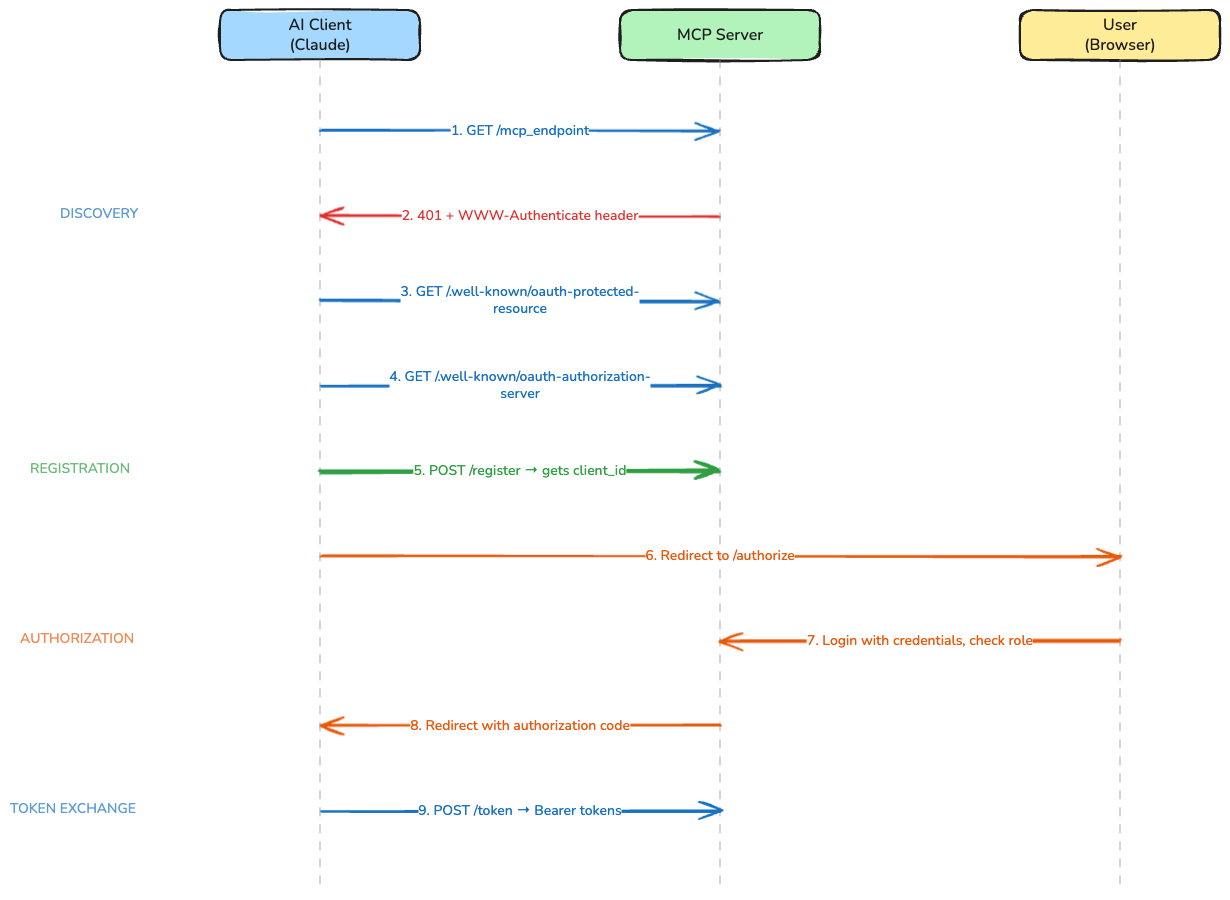
Behind the scenes, nine steps happen automatically:
- The AI client sends a request to the MCP endpoint
- The server responds with
401 Unauthorizedand aWWW-Authenticateheader pointing to its metadata - The client fetches Protected Resource Metadata from
/.well-known/oauth-protected-resource - The client fetches Authorization Server Metadata from
/.well-known/oauth-authorization-server - The client registers itself via Dynamic Client Registration at the
registration_endpointdiscovered in the previous step - this is where it gets its ownclient_idautomatically - The client redirects the user to the authorization endpoint
- The user logs in with their existing credentials, the server checks their role
- The server redirects back to the client with an authorization code
- The client exchanges the code for Bearer tokens and begins MCP communication
Step 5 is the key. Dynamic Client Registration means the AI client generates its own credentials on the fly. No admin involvement. No credential sharing. No configuration beyond the URL.
Implementing the Flow in Rails
The implementation requires four components: the MCP endpoint that triggers the flow, the metadata endpoints for discovery, a registration endpoint for dynamic clients, and the standard OAuth authorization flow. The remaining parts of the OAuth flow - the token endpoint, refresh tokens, and database schema - follow standard OAuth 2.0 patterns and are not covered here. A complete, runnable example with all components is available in the mcp-oauth-demo repository. If your Rails application already uses Doorkeeper, note that it does not support RFC 7591 (Dynamic Client Registration) out of the box, so the registration component will require a custom implementation regardless.
Code examples below are simplified for clarity - they focus on the concepts rather than edge cases. A complete, runnable implementation is available in the companion demo app which you can clone, run locally with ngrok, and test with a real AI client.
1. The MCP Endpoint: Triggering Auto-Discovery
When an unauthenticated request arrives at the MCP endpoint, the server must return a 401 response with a WWW-Authenticate header that tells the client where to find the authorization metadata:
class McpController < ApplicationController
  skip_before_action :verify_authenticity_token
  before_action :authenticate_bearer_token

  def handle
    # MCP request handling logic
  end

  private

  def authenticate_bearer_token
    token = request.headers["Authorization"]&.delete_prefix("Bearer ")
    return if token.present? && valid_token?(token)

    response.headers["WWW-Authenticate"] = %(Bearer resource_metadata="#{resource_metadata_url}")
    head :unauthorized
  end

  def resource_metadata_url
    "#{request.base_url}/.well-known/oauth-protected-resource?scope=my_mcp"
  end
end
The scope parameter in the metadata URL tells the client which scope to request during registration. This becomes important when your application exposes multiple MCP servers with different access levels.
2. Protected Resource Metadata (RFC 9728)
This endpoint tells the client which authorization server protects this resource:
# config/routes.rb
get "/.well-known/oauth-protected-resource", to: "oauth/metadata#protected_resource"
get "/.well-known/oauth-authorization-server", to: "oauth/metadata#authorization_server"
post "/register", to: "oauth/registration#create"

# app/controllers/oauth/metadata_controller.rb
class Oauth::MetadataController < ApplicationController
  def protected_resource
    scope = params[:scope] || "default"

    render json: {
      resource: request.base_url,
      authorization_servers: [request.base_url],
      scopes_supported: [scope]
    }
  end

  def authorization_server
    render json: {
      issuer: request.base_url,
      authorization_endpoint: "#{request.base_url}/authorize",
      token_endpoint: "#{request.base_url}/token",
      registration_endpoint: "#{request.base_url}/register",
      response_types_supported: ["code"],
      grant_types_supported: ["authorization_code"],
      code_challenge_methods_supported: ["S256"],
      scopes_supported: OauthClient::ALLOWED_SCOPES
    }
  end
end
The code_challenge_methods_supported: ["S256"] is mandatory. The MCP specification requires PKCE with the S256 method, and compliant clients will refuse to proceed without it.
3. Dynamic Client Registration (RFC 7591)
This is the component that eliminates manual credential management. When the AI client calls /register, the server creates a new OAuth client on the fly:
# app/controllers/oauth/registration_controller.rb
class Oauth::RegistrationController < ApplicationController
  skip_before_action :verify_authenticity_token

  def create
    scope = validated_scope
    client = OauthClient.create!(
      client_name: registration_params[:client_name] || "MCP Client",
      redirect_uris: registration_params[:redirect_uris],
      scope: scope,
      token_endpoint_auth_method: "none"
    )

    render json: {
      client_id: client.client_id,
      client_name: client.client_name,
      redirect_uris: client.redirect_uris,
      scope: client.scope,
      token_endpoint_auth_method: "none"
    }, status: :created
  end

  private

  def validated_scope
    scope = registration_params[:scope].presence || "default"
    return scope if OauthClient::ALLOWED_SCOPES.include?(scope)

    raise ActiveRecord::RecordInvalid.new(
      OauthClient.new.tap { |c| c.errors.add(:scope, "must be one of: #{OauthClient::ALLOWED_SCOPES.join(', ')}") }
    )
  end

  def registration_params
    params.permit(:client_name, :scope, :token_endpoint_auth_method, redirect_uris: [])
  end
end
Note token_endpoint_auth_method: "none". MCP clients are public clients - they run in browsers or desktop applications and cannot securely store a client secret. The registration endpoint must accept this method. This is secure because the flow relies on PKCE (S256) - a cryptographic challenge verified during token exchange - rather than a static client secret.
4. Authorization With Role Checking
The authorization endpoint is where the user's identity and permissions are verified. This is standard OAuth with one important addition: role-based access control.
# app/controllers/oauth/authorization_controller.rb
class Oauth::AuthorizationController < ApplicationController
  before_action :authenticate_user!

  def authorize
    client = OauthClient.find_by!(client_id: params[:client_id])

    unless current_user.has_role?(client.scope)
      render plain: "Access denied: insufficient permissions", status: :forbidden
      return
    end

    code = AuthorizationCode.create!(
      user: current_user,
      oauth_client: client,
      redirect_uri: params[:redirect_uri],
      code_challenge: params[:code_challenge],
      code_challenge_method: params[:code_challenge_method],
      scope: client.scope
    )

    redirect_to "#{params[:redirect_uri]}?code=#{code.value}",
      allow_other_host: true
  end
end
The has_role? check is what controls access. A team member with the appropriate role logs in and proceeds. A team member without that role sees an access denied message. No admin needs to be involved, and no OAuth credentials need to be shared.
What to Watch Out For
The implementation above is straightforward. Getting it to work with real AI clients in a production environment is where the friction appears. Each of the following issues was invisible during local testing and only surfaced when a browser-based client executed the full flow against a deployed server.
Expose WWW-Authenticate in CORS
The auto-discovery flow starts when the client reads the WWW-Authenticate header from the 401 response. By default, CORS does not expose this header to JavaScript. The browser receives it - developer tools will show it - but the client code cannot access it. The entire discovery chain stops at step one.
Add expose: ["WWW-Authenticate"] to your CORS configuration for every MCP endpoint:
# config/initializers/cors.rb
Rails.application.config.middleware.insert_before 0, Rack::Cors do
  allow do
    origins "*"
    resource "/.well-known/*", headers: :any, methods: [:get, :options]
    resource "/token", headers: :any, methods: [:post, :options]
    resource "/register", headers: :any, methods: [:post, :options]
    resource "/my_mcp",
      headers: :any,
      methods: [:get, :post, :delete, :options],
      expose: ["WWW-Authenticate"]
  end
end
The MCP specification mentions that clients SHOULD support a fallback - probing .well-known URIs directly when the header is unavailable. Not all clients implement this. Do not rely on it.
Sanitize Scope Values From Registration Requests
The WWW-Authenticate header contains a quoted URL with a scope query parameter:
Bearer resource_metadata="https://example.com/.well-known/oauth-protected-resource?scope=my_scope"
Some client parsers extract the scope but include the trailing quote character: my_scope" instead of my_scope. One extra character causes the registration endpoint to reject the request.
Defensive parsing on the server side handles this gracefully:
def validated_scope
  scope = registration_params[:scope].presence || "default"
  scope = scope.delete_suffix('"')

  return scope if ALLOWED_SCOPES.include?(scope)

  raise InvalidScopeError, "must be one of: #{ALLOWED_SCOPES.join(', ')}"
end
More broadly, always test the full flow with the actual AI client. Curl and Postman parse headers differently than browser-based clients and will not reveal these issues.
Whitelist OAuth Redirect Hosts in CSP
If your application has a Content Security Policy with form_action :self (a common production setting), OAuth redirects to external AI clients will be silently blocked. Chrome applies form-action restrictions not only to the form's target but also to redirects that occur after form submission. The login form submits to your application, but the post-login redirect points to the AI client's callback URL - a different origin.
Firefox does not exhibit this behavior, making the issue browser-specific and difficult to diagnose.
Configure allowed redirect hosts through environment variables:
# config/initializers/content_security_policy.rb
Rails.application.configure do
  config.content_security_policy do |policy|
    oauth_hosts = ENV.fetch("OAUTH_ALLOWED_REDIRECT_HOSTS", "")
      .split(",").map(&:strip).compact_blank

    oauth_hosts.each do |host|
      uri = URI.parse(host)
      raise "OAUTH_ALLOWED_REDIRECT_HOSTS: #{host} must be HTTPS" unless uri.scheme == "https"
    end

    policy.form_action :self, *oauth_hosts
  end
end
OAUTH_ALLOWED_REDIRECT_HOSTS: "https://claude.ai"
Adding support for new AI clients becomes a configuration change, not a code change.
Test Through a Tunnel, Not Localhost
All three issues above share a characteristic: they are invisible during local development. Curl bypasses CORS. Local servers do not trigger cross-origin restrictions. Development environments rarely have strict CSP.
Use ngrok or a similar tunneling service to expose your development server with a real HTTPS URL. Connect the actual AI client through the tunnel. Check the browser console for CORS and CSP violations - the server logs will show successful responses while the client silently fails.
The User Experience
After implementing the flow and resolving the three bugs, the experience for a team member looks like this:
- Open the AI client
- Add a new MCP server:
https://app.example.com/my_mcp - A login window opens automatically
- Log in with regular application credentials
- The AI client connects and tools become available
No client_id. No client_secret. No admin involvement. No technical configuration. The user's existing role determines what they can access. Adding a new team member means assigning them the appropriate role in the application - the same process used for any other feature.
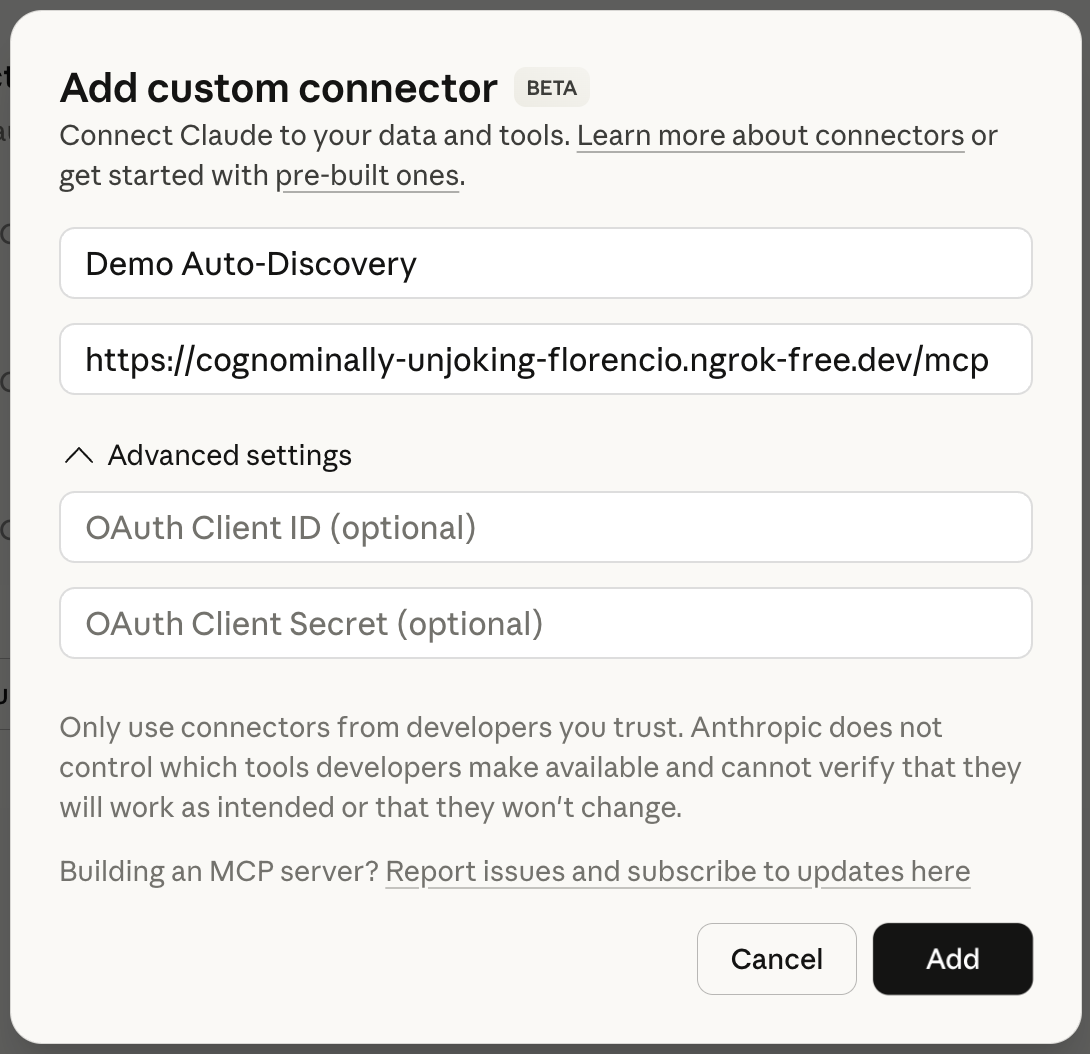
Adding a custom connector in Claude - just the server URL, no client_id or client_secret needed.
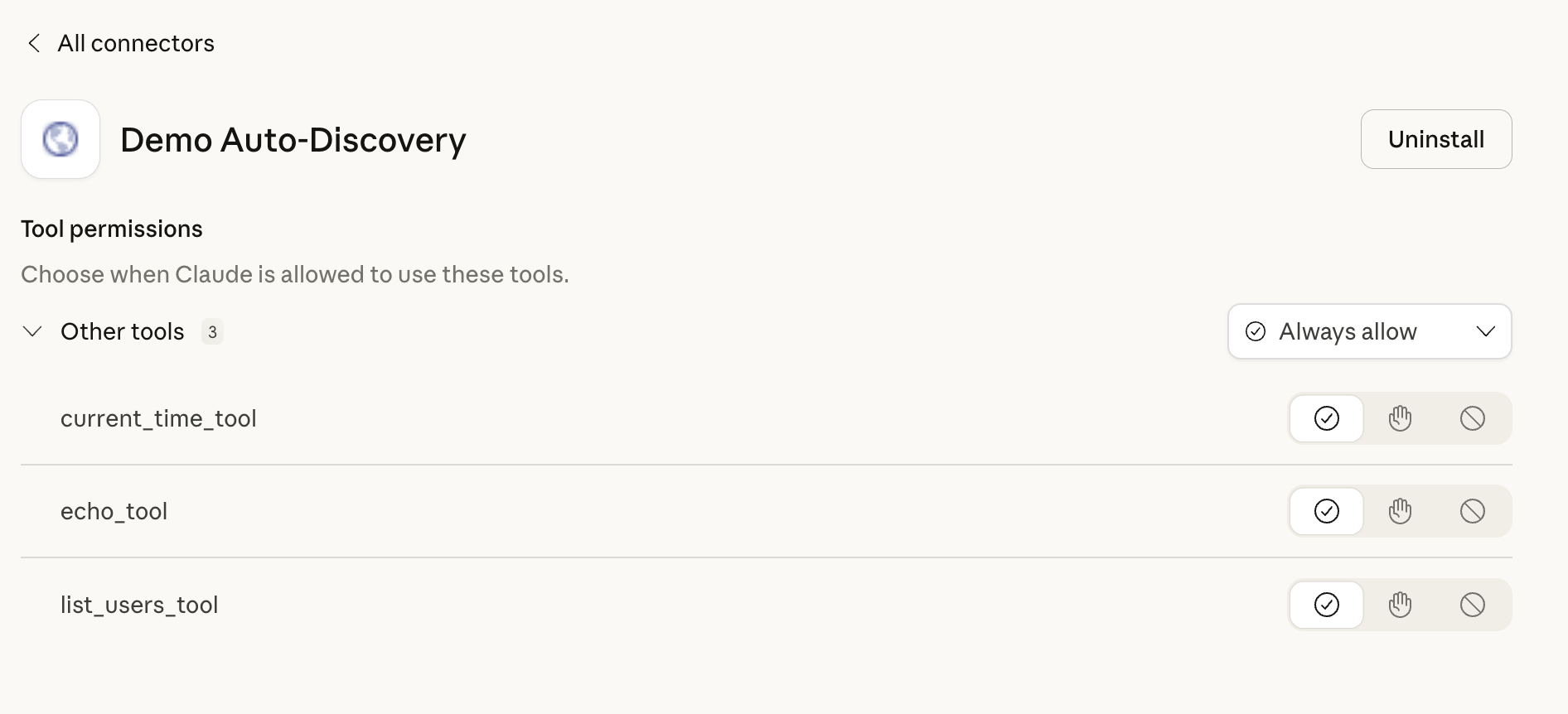
After OAuth auto-discovery, the MCP tools are available - no manual configuration required.
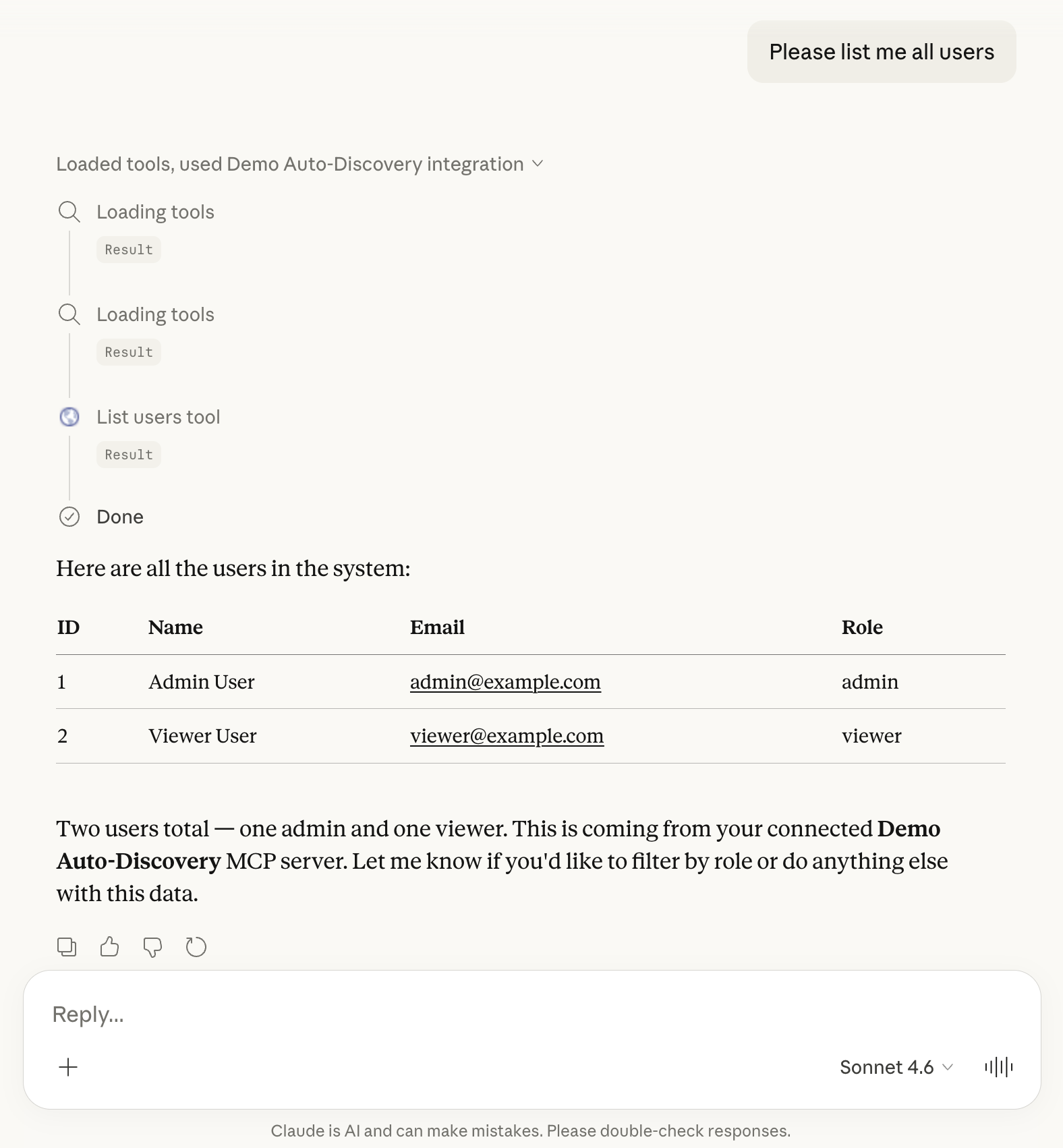
Claude using the connected MCP server to list users - the full flow working end to end.
The MCP specification describes this flow precisely. The implementation in Rails is straightforward. The production bugs are not in the logic but in the gaps between specifications - where CORS, CSP, and parser implementations create friction that only surfaces under real conditions.
The protocol is sound. The implementation details are where the work lives.